
White Zebra Icon Pack1.0.1 - Google Play
Please wait ... The app listing is being verified for availability.
You'll be able to see results in few seconds.
You'll be able to see results in few seconds.
Publisher Description

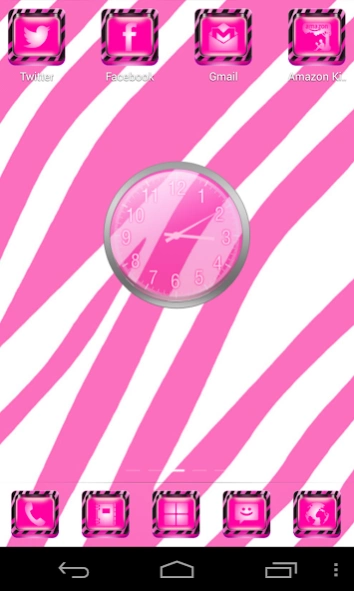


White and pink stripes on 3D icon back in a themed Icon Pack for many launchers
Features (Pink White Zebra Theme plus Icons Pack)• 1150 HD Icons (HD=Tablet Compatible)
• Multiple launchers support (see list below)
• 10 HD wallpapers + 10 Extra wallpapers on-demand
• 9 docks
• 3 app drawer backgrounds
• Wallpaper Changer/Picker
• Replaceable Docks
• Frequent updates on icons
• App works on JellyBean and all supported launchers
Instructions:
• Click OPEN after download, Click APPLY Theme and Select a launcher
• If the icons do not appear for the above launchers then we recommend you to restart your launcher.
• It is also recommended not to move the theme app to SD Card.
Click link here to check out our premium XOThemes: http://goo.gl/Xk8HQD
Supported Launchers
Requirement: Any one of these launchers (Free on Google PlayStore) will work.
• Go Launcher EX
• Nova
• ADW
• Apex
• ADW Launcher EX (Paid on Google PlayStore)
• Atom
• Holo
• Smart
• Action
• Solo
• Next Launcher 3D (Paid, partial support)
This may work with many other launchers:
• TSF Shell
• Dodol, ssLauncher
**** Results may vary depend on launchers
We also have Matching Themes available for other GO products
.
• Please Search for XOTHEMES on Google Play
Contact/Follow Us:
• Twitter: http://www.twitter.com/@xo_studio
• Facebook: http://www.facebook.com/xothemes
• GooglePlus: https://plus.google.com/+MichaelAXoThemes/posts
• Website: http://www.xothemes.com (see screenshots)
• Email: Ten.Designer@gmail.com
(2) Click on More by Developer in this page to see more themes
(3) More Screenshots of our themes at our website http://xothemes.blogspot.com
FAQ:
♥
Why is ADW not showing my icons after applying?
> Restart ADW to refresh screen.
>>> Click in ADW Settings, click System, Restart ADW.
♥
Which are the best launchers?
> They have their strengths and weaknesses.
♥
What is masking?
> Masking = all your icons will be skin/themed exactly the same shape. This will give your phone a uniform look.
♥
Why GO Launcher is not showing my icons right, some are too dark?
> GO launcher doesn't support masking. So go into Preferences, click icon and uncheck Iconbase option.
You can hide the icons that you don't like for uniform look.
Sincerely,
Michael A.
Designer & Developer
XOThemes Company Inc.
POLICY
(1) We love our value customers so we have a 15 minutes FREE to TRY. Enjoy theming! XOPAIDAPP
About White Zebra Icon Pack
White Zebra Icon Pack is a paid app for Android published in the Themes & Wallpaper list of apps, part of Desktop.
The company that develops White Zebra Icon Pack is XOTHEMES. The latest version released by its developer is 1.0.1.
To install White Zebra Icon Pack on your Android device, just click the green Continue To App button above to start the installation process. The app is listed on our website since 2014-01-25 and was downloaded 0 times. We have already checked if the download link is safe, however for your own protection we recommend that you scan the downloaded app with your antivirus. Your antivirus may detect the White Zebra Icon Pack as malware as malware if the download link to com.xo.iconpack.whitepinkzebra is broken.
The company that develops White Zebra Icon Pack is XOTHEMES. The latest version released by its developer is 1.0.1.
To install White Zebra Icon Pack on your Android device, just click the green Continue To App button above to start the installation process. The app is listed on our website since 2014-01-25 and was downloaded 0 times. We have already checked if the download link is safe, however for your own protection we recommend that you scan the downloaded app with your antivirus. Your antivirus may detect the White Zebra Icon Pack as malware as malware if the download link to com.xo.iconpack.whitepinkzebra is broken.
How to install White Zebra Icon Pack on your Android device:
- Click on the Continue To App button on our website. This will redirect you to Google Play.
- Once the White Zebra Icon Pack is shown in the Google Play listing of your Android device, you can start its download and installation. Tap on the Install button located below the search bar and to the right of the app icon.
- A pop-up window with the permissions required by White Zebra Icon Pack will be shown. Click on Accept to continue the process.
- White Zebra Icon Pack will be downloaded onto your device, displaying a progress. Once the download completes, the installation will start and you'll get a notification after the installation is finished.
Program Details
System requirements
Operating systems
Android
Download information
File size
N/A
Total downloads
0
Pricing
License model
Paid
Price
Version History
Here you can find the changelog of White Zebra Icon Pack since it was posted on our website on 2016-10-15. The latest version is 1.0.1 and it was updated on Apps112 on 13 October, 2026. See below the changes in each version:
version 1.0.1
posted on 2014-01-26
Disclaimer
Official Google Play Link
We do not host White Zebra Icon Pack on our servers. We did not scan it for viruses, adware, spyware or other type of malware. This app is hosted by Google and passed their terms and conditions to be listed there. We recommend caution when installing it.
The Google Play link for White Zebra Icon Pack is provided to you by apps112.com without any warranties, representations or guarantees of any kind, so access it at your own risk.
If you have questions regarding this particular app contact the publisher directly. For questions about the functionalities of apps112.com contact us.
